Well I am wondering what and why? So back with the 8-2019 FW and some things were trimmed out. So I updated the camera to the new 12-19 FW and for the life of me I don't see anything new over the 8-19 FW... Now I am not sure what the deal is after I made the first camera update I didn't see anything on the update that was different unless it makes the Crazy PTZ issue go away however I wouldn't really know I don't think because one of the things I think is that first camera I did the update with is a 2015 FIRST production camera that came with the First FW on it... I never noticed the issues with PTZ that I did with the other camera.. So I thought ok lets upgrade the 2018 camera that came to me with the 8-19 FW loaded from factory... Right off the Start up came all off in la la land when it loaded. SO i think Ok the Presets have been ok for the last month I have had Preset 1 good for a while. So I have it go to Preset 1 and it is off to the left of the area that the camera is even watching.. I have never had that area with a Preset... So i think ok lets see what happens with the Tour wonder if it will just be that much off on all of the presets. That is much more off then just the little. SO I go back and setup my Presets so my system can get back to recording what I record and not the wall... So I log in with Chrome and look around. When I first load the camera it acts little strange... I don't understand the 2015 camera isn't acting this way... When I click on Setup there was like 2 of every option on the page and cleared up rather fast but did it for all of the menus like it was seeing different from memory on my Chrome but updating to what is there now... I don't know just a guess... So I go back to live view and the next issue comes up that is only on the Web view was I seeing this but the Picture while watching Live View Glitches then goes blank and comes back up... SO I say only on there because I am using my Computer that has monitor over my NVR Monitor I can see what is on my NVR at the same time as my computer screen and when it glitched on there it did not glitch on the NVR screen... I was expecting to see some of the things that was removed in the first JS update returned however I can't find anything that has been returned or what has changed from the 8-19 to the 12-19 FW...
So Removed off the Live view no longer any Help Button, Mic Button, Multi Snap shot button, Digital Zoom button, or Record Button they are still all gone. Then there is loads missing off the bottom of the screen as well. Seeing there is now only a PTZ button. All the other options are not there still...
I am going to test the Ability to DG my older camera to the first 2019 FW as it is there still on the page of FW I am going to guess that it is ok to stay on the JS update maybe I can find out what has changed...
I am going to add 2 pictures one form 2.250 FW with all the buttons I was referring to.. and one from the 12-19 2.420 FW.. Only thing changed is I reduced the image size 50% of what it was other then that there is no image doctoring..
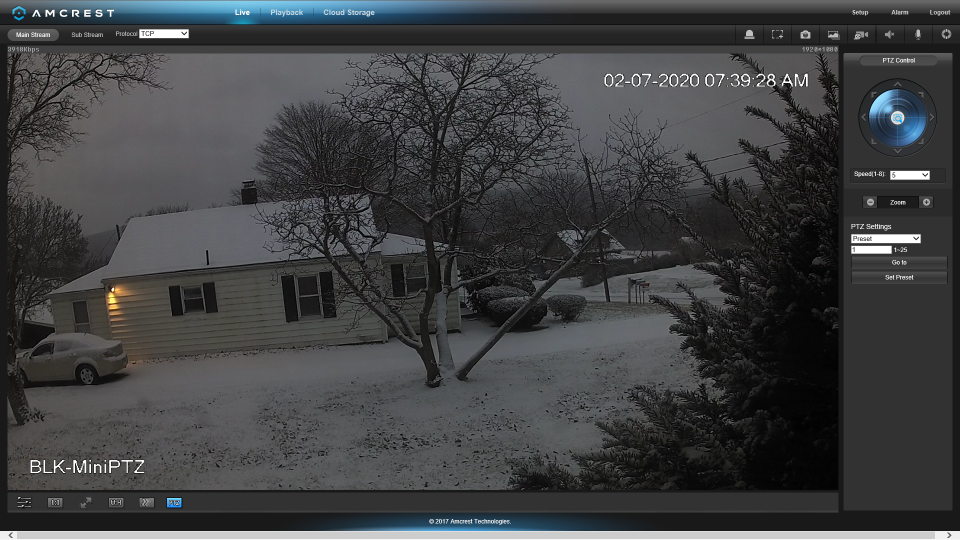
- Screenshot (746).png (579.55 KiB) Viewed 215 times
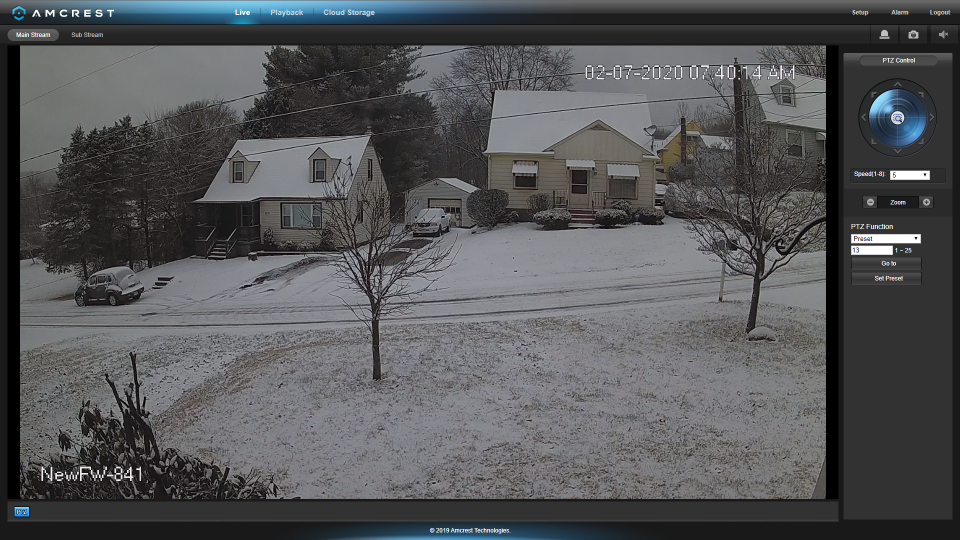
- Screenshot (747).png (665.19 KiB) Viewed 215 times
Any other cameras that I buy if I buy anymore 841's will be with FW before the new JS at this time do to the fact I prefer all the other options that are Still missing. LIttle Upsetting but what can you do? Nothing just deal with it...
Be Safe.
