Page 1 of 1
ip4m-1083ew-ai setup
Posted: Wed Nov 02, 2022 8:08 am
by laotzse
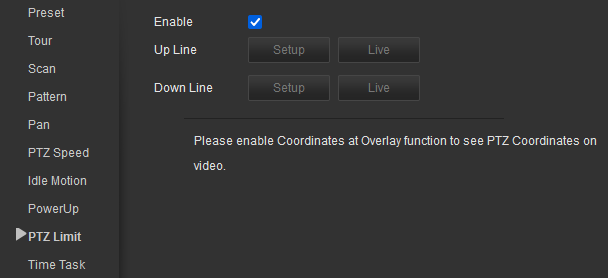
How does one set the limits within which the camera PTZ functions are allowed to pan? Surely I should be able to do this? It seems stupid to have the camera follow an object into a wall. Is it done with the PTZ Limit?
- Screenshot 2022-11-02 100557.png (12.54 KiB) Viewed 1184 times
I check the Enable box, but the Setup and Live buttons, next to Up Line and Down Line, seem to be disabled.
Thanks everyone in advance.
Re: ip4m-1083ew-ai setup
Posted: Wed Nov 02, 2022 11:47 am
by Revo2Maxx
Hello and Welcome to the Forum..
Is there a Save Screen? where you can save that option? Does it say it has saved? after you checked it? When you leave the page and return to the page does it still show it is Enabled?
I know my PTZ camera isn't as advanced as yours and only limit offered is on setting up Scan. I really wish mine had the end stops so I could use Pan option without it going 360.. It is a Feature I use on an older different company PTZ I own..
Re: ip4m-1083ew-ai setup
Posted: Wed Nov 02, 2022 1:52 pm
by laotzse
No, that screen doesn't have a Save button and when I go back to it, Enable box does get saved.
My problem is, this user interface does not let me set any values to the Up Line and Down Line parameters, being that both the Setup button and the Live buttons are disabled (greyed out).
Re: ip4m-1083ew-ai setup
Posted: Wed Nov 02, 2022 2:48 pm
by Revo2Maxx
I have asked and have not anything to report yet. So while last thing someone wanted to do is learn CGI commands for a camera however that might be an option for you. However maybe do this command changing to your IP for the camera if it is connected to your normal network if not then will have to be creative.
http ://10.0.0.70/cgi-bin/ptz.cgi?action=getStatus
When I run the command this is all I get! So wonder if yours being as new and updated it is if it offers more? There is commands for setting end points I tried it on mine however my guess is that it isn't an option because mine don't do anything when ran.
status.Focus.FocusPosition=0.000000
status.Focus.Status=Unknown
status.Iris.IrisValue=11.000000
status.Iris.Status=Idle
status.MoveStatus=Idle
status.PTS=0
status.Postion[0]=195.400000
status.Postion[1]=31.000000
status.Postion[2]=1.000000
status.PresetID=0
status. Sequence=0
status.UTC=0
status.ZoomStatus=Idle
status.ZoomValue=100
Re: ip4m-1083ew-ai setup
Posted: Wed Nov 02, 2022 8:41 pm
by jack7
I'm not sure what you are doing with manual or auto tracking, but you may be in the wrong place to control the tracking area.
I don't have your camera, but from my quick look at your camera User Manual, you should check out pages 15-16 and pages 53-54. Or do a document search on "track".
https://drive.google.com/file/d/1hCm9RX ... sp=sharing
Good luck with your tracking.
Re: ip4m-1083ew-ai setup
Posted: Thu Nov 03, 2022 1:17 am
by Revo2Maxx
My guess jack7 is that they are trying to setup the camera like one of my older AI cameras that has Motion tracking, From what they said in the first post if someone goes into an area that is looking at the wall they are trying to set a Limit on the Pan area from tracking an object into a wall and while I can't say how long or if that camera has an option like mine does on return to home on loss of tracked object or if it just sits looking at the wall trying to pickup the object as I have both options on my older camera and I have it setup to just return to Guard position.
So with my camera I was able to setup a Pan to the left and pan to the right stop areas and doing so will not let my camera go past them points without instructions to do so.
So my guess is that is what they were trying to deal with..
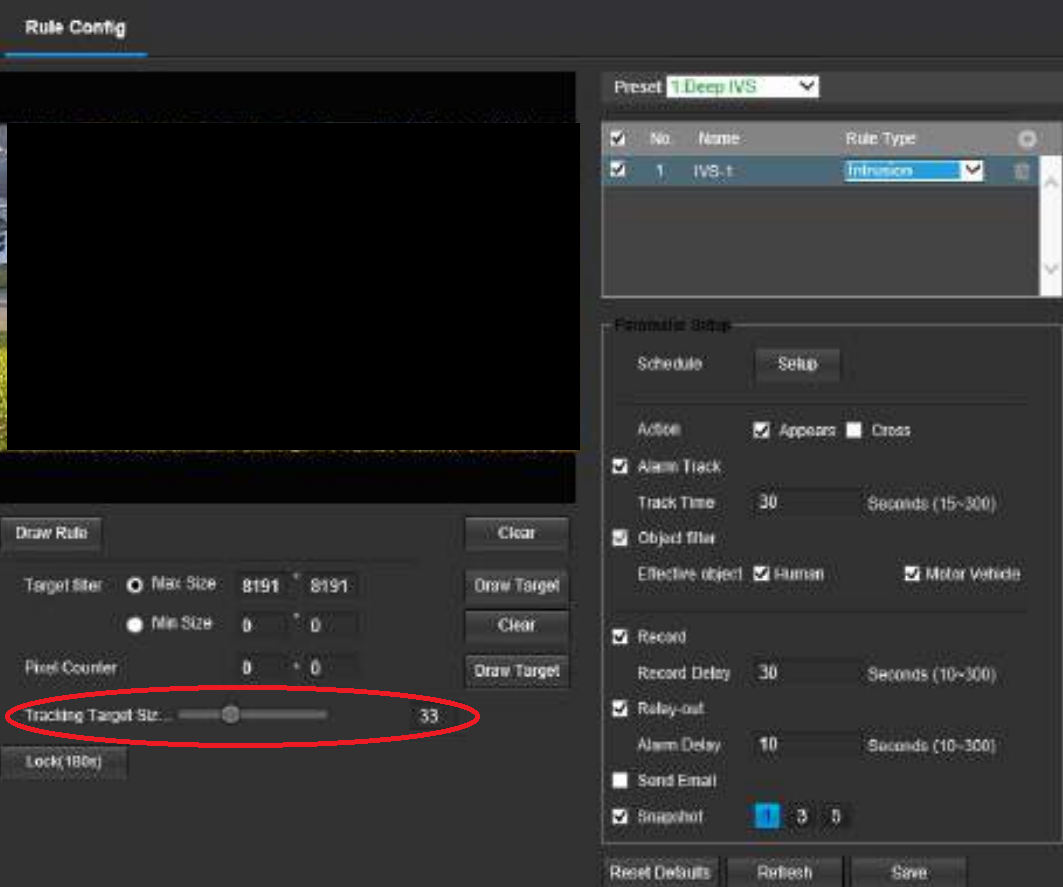
However looking at the Doc, 53-59 it keeps talking about Tracking size and then the text behind that says tracking area and to be honest could be the odd thing they are looking for or might have nothing to do with tracking into the wall. Maybe that is what they need to adjust
Like I said on one of my older AI cameras from a different company, I had to setup end stops to keep it from going into the wall when I had it setup to search after object is lost, I have added the end stops and I also changed the return to Guard position on loss of object for faster return to normal view area..
- Screenshot (3551).png (292.86 KiB) Viewed 957 times
Re: ip4m-1083ew-ai setup
Posted: Thu Nov 03, 2022 8:35 am
by laotzse
Thank you, Revo2Maxx and Jack7, for chiming in. My thinking is, most people using this camera are not mounting it on a pole in the middle of a square, where you might need to pan it 360 degrees. More likely, people have it mounted on the side of a building. Why won't they allow the user to set the limits of the PTZ motion? If the camera lets me define presets, limits should be really easy to implement.
Re: ip4m-1083ew-ai setup
Posted: Thu Nov 03, 2022 11:10 am
by jack7
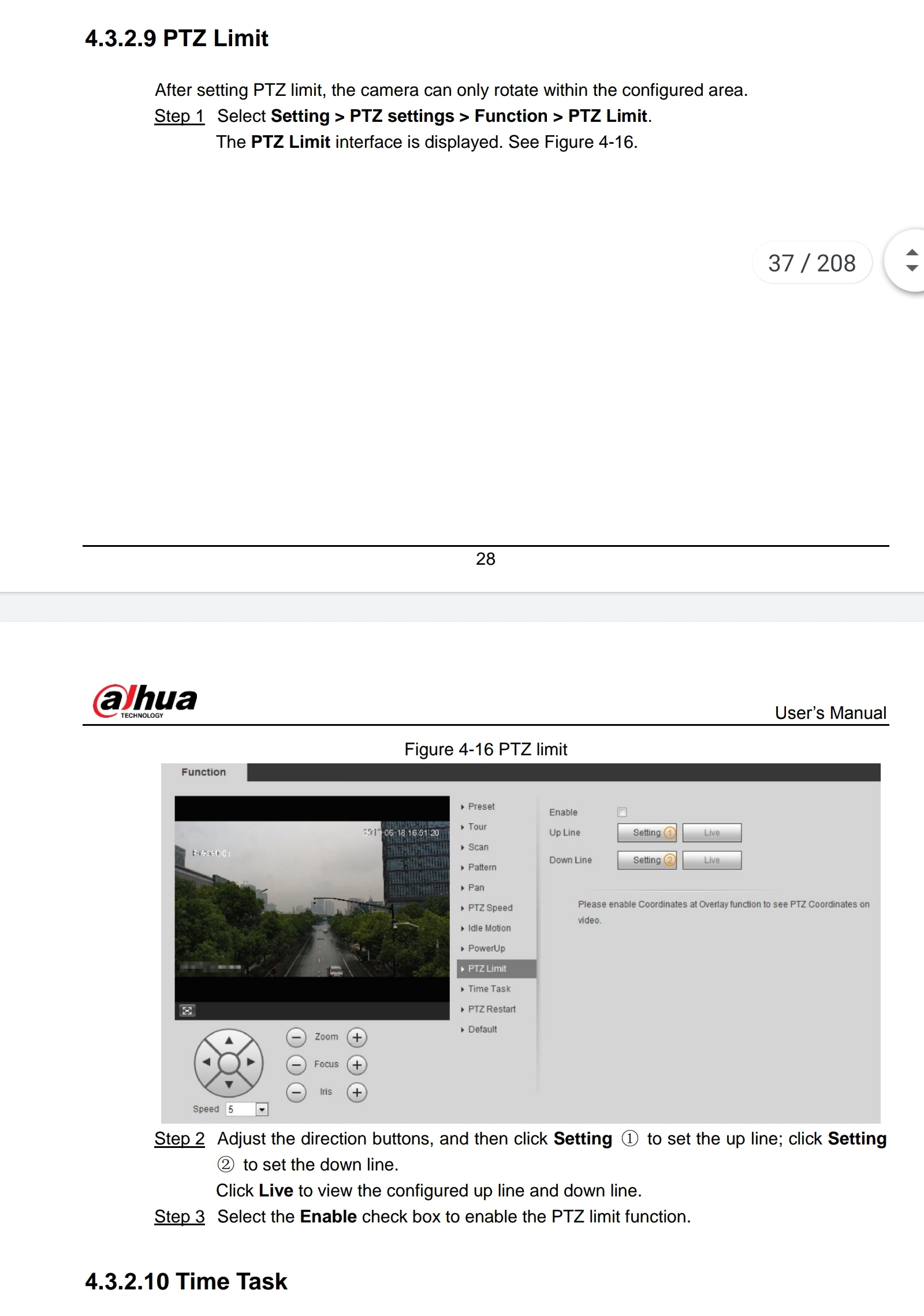
OK, try these instructions Do not click enable first.
- Screenshot_20221103-115149_Google PDF Viewer.jpg (510.21 KiB) Viewed 950 times
Amcrest support should be helping you with an $800 camera.
Re: ip4m-1083ew-ai setup
Posted: Thu Nov 03, 2022 12:24 pm
by laotzse
Thank you jack7! That was very helpful. I was able to follow that set of instructions and set the limits for the tilt angle or vertical angle. I can't believe the Amcrest documentation doesn't explain this very non-intuitive user interface.
Setting the tilt angle limits is good, but I was looking to set the horizontal angle limits too. You are right. Let me try Amcrest Support.