Well a Log server is ok but there is just TMI there that may or may not be related to the Camera. So then within a Syslog one would need to then access the camera or device on the IP it is tracking to and see what info it might show in there.. From the log of a 841v3 this is from mine only showing first 12 lines.. However just so your aware your camera will reach out on a few different servers and after someone turns off P2P if they didn't want it calling home it can still take up to a few hours for the Traffic to stop. Ip address that are active on the camera only showing 2 in the text because the NVR IP is lower in the logs and one way you know if don't remember the IP of your Recorder is it shows an ip and then says DVRIP. The address showing is from my main computer and the app via P2P..
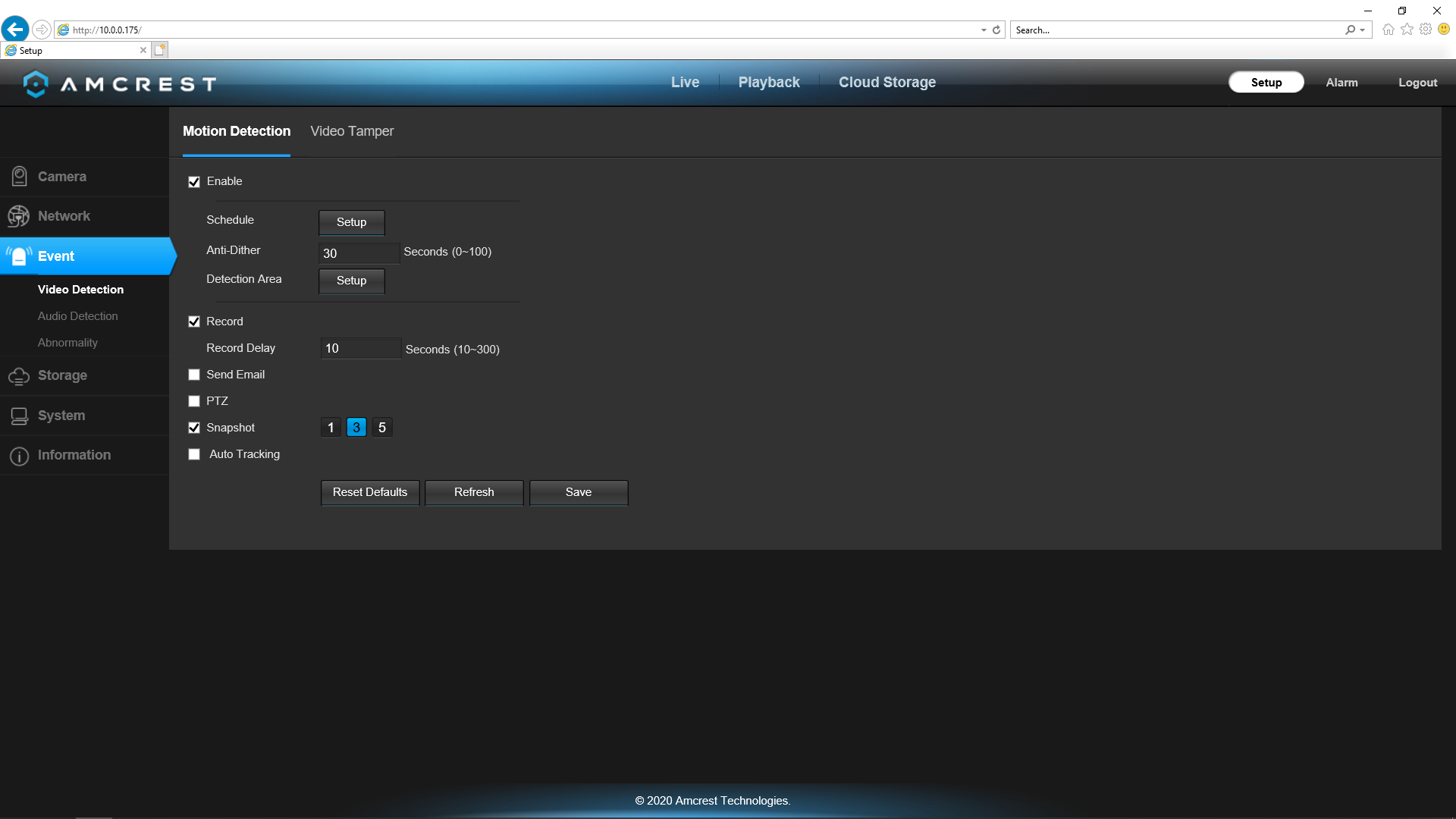
Now about the camera being on Auto Track, It don't come up with it setup that way. It would have to be turned on. You can see it in the picture below just above the Reset Default on the page.
1 admin 2022-04-03 17:51:01 Set Time {"Address":"10.0.0.119","Before":"04-03-2022 05:51:01","Type":"Web3.0"}
2 admin 2022-04-03 17:50:58 Login {"Address":"10.0.0.119","Type":"Web3.0"}
3 admin 2022-04-03 14:47:45 Logout {"Address":"10.0.0.119"}
4 admin 2022-04-03 14:38:45 Set Time {"Address":"10.0.0.119","Before":"04-03-2022 02:38:45","Type":"Web3.0"}
5 admin 2022-04-03 14:38:43 Login {"Address":"10.0.0.119","Type":"Web3.0"}
6 admin 2022-04-03 13:33:32 Logout {"Address":"10.0.0.119"}
7 revo2maxx 2022-04-03 13:27:12 Logout {"Address":"127.0.0.1"}
8 revo2maxx 2022-04-03 13:16:57 Logout {"Address":"127.0.0.1"}
9 revo2maxx 2022-04-03 12:49:15 Logout {"Address":"127.0.0.1"}
10 revo2maxx 2022-04-03 12:49:14 Logout {"Address":"127.0.0.1"}
11 admin 2022-04-03 12:37:34 Set Time {"Address":"10.0.0.119","Before":"04-03-2022 12:37:34","Type":"Web3.0"}
12 admin 2022-04-03 12:37:32 Login {"Address":"10.0.0.119","Type":"Web3.0"}
- Screenshot (2246).png (152.69 KiB) Viewed 1362 times