Page 1 of 1
Camera Shows Offline But Liveview Works on App
Posted: Mon Feb 22, 2021 9:21 am
by W3BIG
Hello All,
We have camera model iP2M-858W and on the Amcrest Surveillance Pro (Desktop PC application) it is showing offline, but when logging in on the app (i-phone) it is showing online. The PC app is not showing the live-feed, but the i-phone app is.
Also, is there a direct website I could log in to see the live-view without using the PC app? We know the camera is up and running, but for some reason we can't see the live-view on the PC app.
Thank you kindly,
Re: Camera Shows Offline But Liveview Works on App
Posted: Mon Feb 22, 2021 9:43 am
by longedge
Hello and welcome to the forum.
Firstly with regard to ASP, one of my cameras does this now and again and, although I should try and diagnose the problem more thoroughly, my remedy at the moment is to go to ASP/Devices page and Manually Logout (centre icon in the Operations tab) and immediately click on it again to Manually Login. This is a toggle button i.e. if you're logged in then it logs you out and vice versa. This works every time for me.
Your camera has a web interface that you can access by typing in the IP address to your web browser provided you are also on the same LAN as the camera.
If you are talking about access from a remote location then the best/safest way forward is to look at access via P2P.
Re: Camera Shows Offline But Liveview Works on App
Posted: Mon Feb 22, 2021 9:56 am
by W3BIG
Thank you for the reply, in regards to your first answer, on my Devices Page the only 4 symbols that are showing are "Modify / Device Config / Manually Login / Delete". I'm not seeing a Logout Icon.
Can you also explain to me how to get to the IP address for the camera? I'm not proficient at these things at all lol, please excuse the ignorance. Unless you mean the domain name? I see that on the PC Desktop app.
Also what is the P2P function? Is that like accessing it from another desktop PC?
Thank you kindly,
Re: Camera Shows Offline But Liveview Works on App
Posted: Mon Feb 22, 2021 10:10 am
by longedge
OK, this is my devices page.

- devices.jpg (18.63 KiB) Viewed 2251 times
The third column shows me what the IP address (Yes IP/Domain Name) of each device is (3 cameras and PC-NVR which is treated as a separate device). Note that I have deliberately logged out of one camera (the bottom one) and the icon is different. As I said, it's a toggle i.e. it does something different depending on the current state. If in your case it currently says "Manually Login" when you hover over it, then that's the problem. Login and all should be well

Re: Camera Shows Offline But Liveview Works on App
Posted: Mon Feb 22, 2021 12:14 pm
by longedge
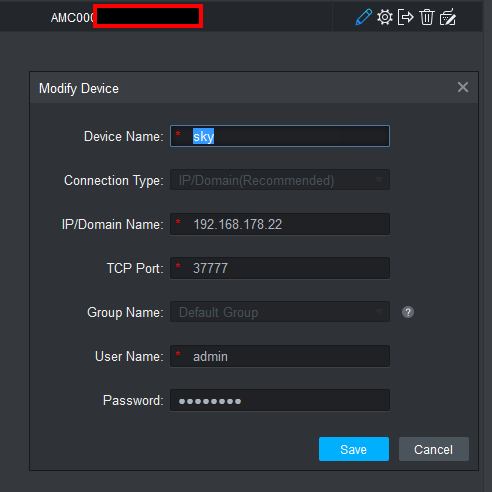
If you click on the Modify Icon (the pencil) you should see something like this
- setting.jpg (22.4 KiB) Viewed 2251 times
I would be inclined to delete that camera and start again by adding it using the LAN IP address. The way I get the IP is to log into my router admin page and look at devices currently logged onto the LAN. If you search the Amcrest Site you will also find an app called IPCONFIG that allows you to 'discover' devices.
https://support.amcrest.com/hc/en-us/ar ... g-Software
N.B. For the sake of security I've deleted your last post because you included the camera serial number
.